## Oracle Developer Tools for Visual Studio
**Questions or feedback about this extension? Please post your questions, comments, or report issues on the [Oracle Developer Tools forum](https://forums.oracle.com/ords/apexds/domain/dev-community/category/oracle-developer-tools-for-visual-studio).**
Oracle Developer Tools for Visual Studio 2022 is a free Visual Studio extension that makes it easy to connect to your Oracle Database and Oracle Autonomous Database, browse and modify schema objects and data, edit and debug SQL and PL/SQL with IntelliSense, perform schema comparisons, tune SQL and .NET app performance, and more. Use Oracle Cloud Explorer to easily create an Always Free Oracle Autonomous Database instance in the cloud.
These tools are a required component to enable development with Entity Designer and Table Adapter Configuration Wizard. Use these tools with Oracle Autonomous Database and Oracle Database servers on any platform (Linux, Unix, Windows).
**What's new in 23.8**:
- Improved IntelliSense: Ctrl-Space suggestions, stored proc/func parameter info, hover for info and more
- Real-Time SQL Monitoring with Active Reports
- PL/SQL Debugger support for containers and IP address resolution differences between server and client
- Code generation for C#, Python, Java(JDBC), and Javascript (Node.js)
- Oracle Autonomous Database management enhancements including walletless configuration
- HTTPS Proxy settings to allow database connections from behind firewalls and similar scenarios
- Visual Studio Theming support
**Documentation**:
View the [documentation](https://docs.oracle.com/en/database/oracle/developer-tools-for-vs/23.8/online-help/) and [release notes](https://www.oracle.com/database/technologies/appdev/dotnet/odt2380readme.html).
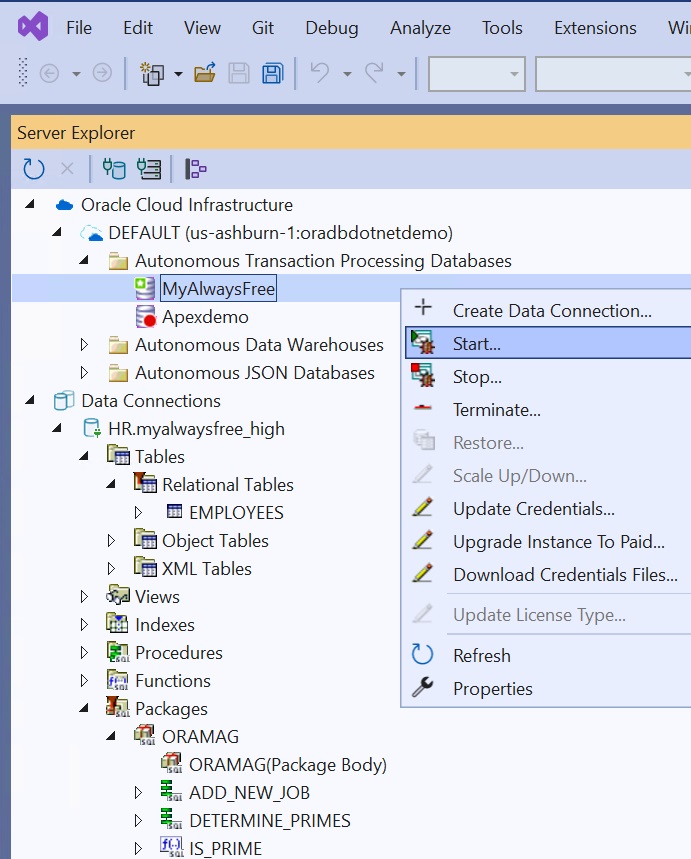
Browsing and managing Oracle Autonomous Database (left) and editing and debugging PL/SQL (right)
## Key Features
- **Oracle Autonomous Database Integration**
View and Manage your Oracle Autonomous Databases from Server Explorer. You can quickly create no cost Always Free Autonomous Database instances from Visual Studio, automatically download credentials files and be connected to the database to work on code within minutes. To learn more, view this step-by-step walkthrough.Oracle Cloud Explorer
- **Adhoc SQL Execution, Data Editing, Stored Procedure Testing**
When testing your .NET application you can use the Oracle Data Window to insert and update Oracle data. There's also a testbed for testing stored procedures and an Oracle Query Window for executing any SQL statement you choose.
- **Use IntelliSense to autocomplete schema objects**
Type SQL into the Query Window or the PL/SQL Editor then press Control-Space and IntelliSense suggestions will appear. Enter a schema name, schema object name, or alias followed by a period (".") to show the child objects. Enter a stored procedure or function name and autocomplete the parameter list. Modify the settings to choose whether the suggestions use uppercase, lowercase, or titlecase.
Query Window with IntelliSense SuggestionsParameter info for a procedureAutocompletion of a procedure with placeholder values
- **Browse and modify an Oracle Schema**
Use Server Explorer to connect to and browse your Oracle schema and view and modify data. Then launch one of many Oracle designers and wizards to create and alter schema objects.
Table Designer
- **PL/SQL Editor and Debugger**
Edit PL/SQL objects in-database and leverage IntelliSense. Use all of your favorite Visual Studio debugging features from within PL/SQL code. You can seamlessly step from your .NET code into your PL/SQL stored procedure code and back out again.
- **SQL Script Editor and Execution Engine**
Edit Oracle SQL*Plus scripts and run them from inside Visual Studio.
- **Real-Time SQL Monitor, SQL Tuning and Application Tuning tools**
Use Real-Time SQL Monitor to investigate poorly performing SQL and PL/SQL and generate an Active Report that you can share with your DBA. Use Oracle Performance Analyzer to tune your .NET application's use of Oracle Database via a single click of a button. The database is then monitored under load and recommendations are made. Use SQL Tuning Advisor to tune ad-hoc SQL statements in Query Window with SQL Tuning Advisor.
Real-Time SQL Monitor Window. Click a SQL ID to view an Active ReportView an Active Report inside Visual Studio
- **Oracle Database Project (Version 2)**
Import a set of SQL scripts representing your schema in Oracle Database Project and check them into source control.
- **Schema Compare Tools**
View differences between two schemas and generate a diff script that can modify a target schema to match the source schema. Compare live database instances and/or an Oracle Database Project (V2) containing a set of SQL scripts representing a schema.
Schema Compare Results
- **Multitenant Container Database Features**
Developers using Oracle Database can easily and quickly create, clone, plug or unplug pluggable databases for use during development and testing.
- **Entity Designer and Table Adapter Configuration Wizard**
These tools provide integration with built in Visual Studio data features and are required if you wish to use these designers and wizards.
## Older Versions
Click the links below to download .VSIX files for older versions:
[23.6.0](https://urldefense.com/v3/__https://marketplace.visualstudio.com/_apis/public/gallery/publishers/OracleCorporation/vsextensions/OracleDeveloperToolsForVisualStudio2022/23.6.0.0/vspackage__;!!ACWV5N9M2RV99hQ!PGfRrsUCt6NvwtqCaI-spQ4f-0olAF0eCOJBUQnjwnh4x3L6NULdPr_nbRWY3NTeo0S_2OO7iUdxzq0ikNNe$)
## Have a Question? Socialize with Us:
[Oracle Discussion Forums (Feedback and Help)](https://community.oracle.com/community/groundbreakers/database/developer-tools/windows_and_.net/oracle_developer_tools_for_visual_studio)
[Oracle .NET Twitter](https://twitter.com/oracledotnet)
[Oracle .NET and Windows Youtube Channel](https://www.youtube.com/user/OracleDOTNETTeam)
[Oracle .NET Development Center](https://www.oracle.com/database/technologies/appdev/dotnet.html)
##
Please refer to the [Licensing Information User Manual for Oracle Developer Tools for Visual Studio](https://docs.oracle.com/en/database/oracle/developer-tools-for-vs/index.html) for additional licensing information including third-party notices and/or licenses.